Using the Internal Reflector
The Internal Reflector is a lightweight service that enables fAST Dynamic (FD / DAST) scanning against internal, non-internet-facing applications. It is compatible with V2 Engine assets only.
| V2 Engine assets and the internal reflector are both currently in Early Access. To request access to these features, contact support. |
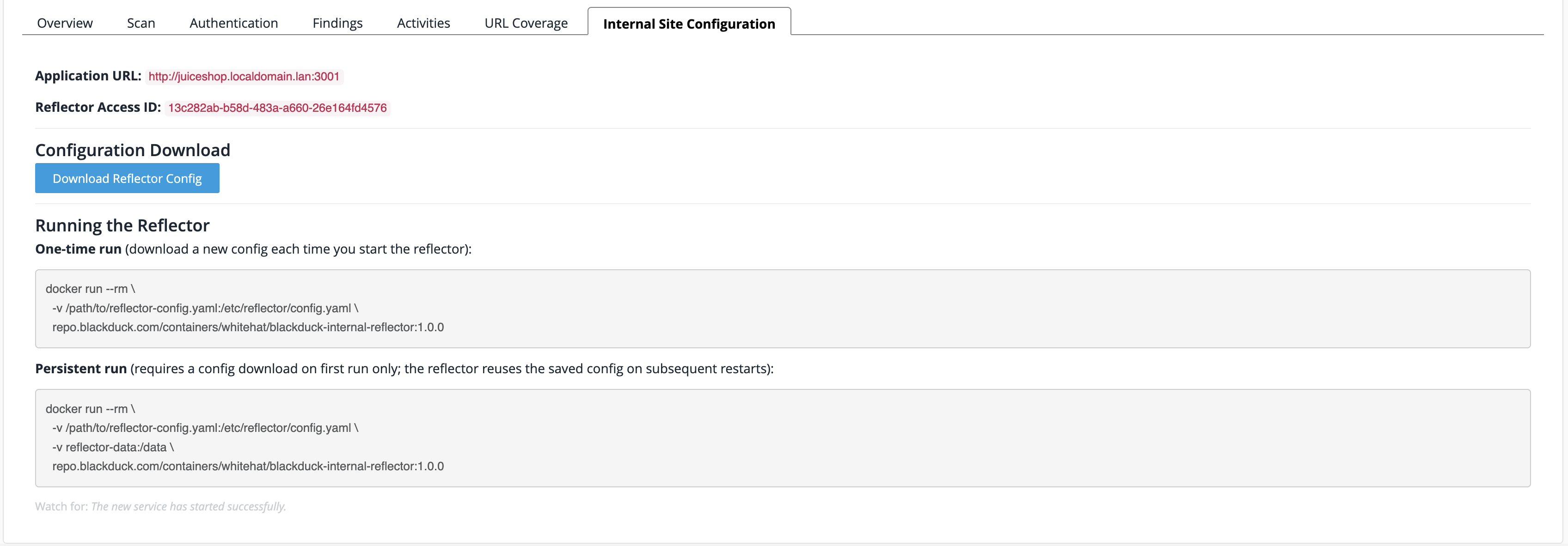
If you have a V2 Engine asset for an internal application, in order to perform FD/DAST scans on it you’ll need to download the reflector configuration (YAML) file from the asset’s Internal Site Configuration tab. You can then run the reflector in one of the following two ways:
-
One-time (single) run - this requires you to re-download the configuration data each time you activate the reflector. Typically, this would be used during initial set up and testing.
-
Persistent run - this allows you to retain the same configuration data each time you activate the reflector.
The internal reflector does not allow use of localhost as a host name. If you were planning to use that, you’ll need to give it an alias instead (resulting in a hostname and port such as bd-demo.local:8080).
|
Prerequisites
-
Install Docker or another runtime capable of running Docker containers.
-
Ensure that your internal site is running and is accessible on your network.
-
Create the corresponding V2 Engine asset and give it the URL for your running internal site.
Downloading the configuration
To download the configuration, navigate to the Asset Management page and perform the following steps:
-
Select the name of your V2 Engine asset.
-
Select the Internal Site Configuration tab.
-
Select Download Reflector Config.
-
Move the downloaded YAML file to a location on the server running your site (for example, a restricted/local network or your local machine).
Running the reflector
-
Still on the Internal Site Configuration tab, copy the
dockercommand from the relevant code block depending on whether you want to perform a one-time run or a persistent run, and paste it into a text editor. -
Modify the copied command to replace the sample path with the actual location where you moved the downloaded file.
-
From the network location where you moved the downloaded file, run the modified command in your CLI.
The internal reflector service is now running in the new Docker container, and Continuous Dynamic can now access your site asset via the provided URL.